# 登录功能
运行时动态化渲染方案下
# LoginButton
支持参数:
- onClick // 已登录后点击才触发
- openType // 默认为'getPhoneNumber',可传入contact/getPhoneNumber/getUserInfo/share
- onGetPhoneNumber // 未登录吊起获取手机号码弹窗后,点击拒绝或允许按钮触发
注意:onGetPhoneNumber方法,可以根据:e.type === 'getphonenumber' && !e.loginSuccess 来判断用户在吊起手机号码弹窗后,点击的是拒绝还是允许
# 登录按钮 demo
功能:未登录时点击获取手机号码,已登录就是一个普通按钮
天工平台任意一个元素添加行为:
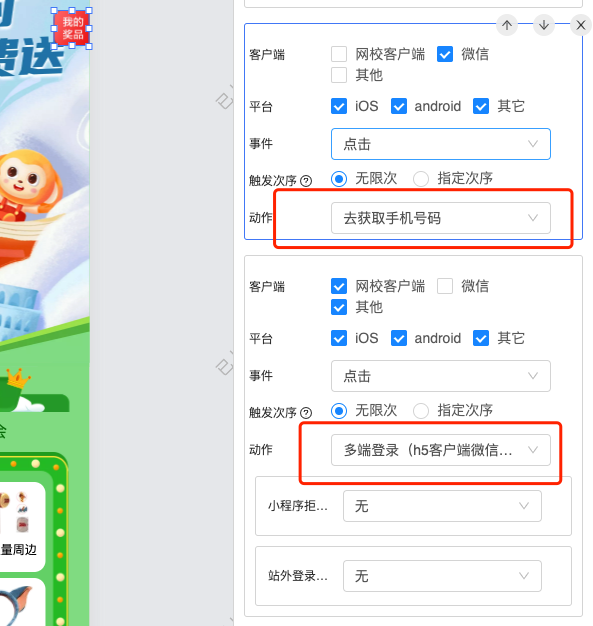
外部组件内使用:
const login = (ctx, next, e) => {
  if (ctx.getClient() === 'wxmini' && e.type === 'getphonenumber' && !e.loginSuccess) { // 在小程序内 loginSuccess 是false,表示吊起小程序获取手机号码弹窗后,选择了拒绝
    return
  }
  const isLogin = ctx.getPageDataByKey('isLogin')
  if (isLogin) {
    next()
  } else {
    ctx.login({
      successType: 'custom',
      success: next
    });
  }
}
const getActionButton = (ctx) => {
  const isMini = ctx.getClient() === 'wxmini'
  if (!isMini) {
    return (
      <button
        onClick = {
          this.login.bind(this, ctx, () => {console.log('logined')})
        }
      >点击</button>
    )
  }
  return (
    <LoginButton
      onClick = { // 已登录后点击触发,如果未登录时点击不处罚
        this.login.bind(this, ctx, () => {console.log('logined')})
      }
      onGetPhoneNumber= { // 在吊起获取手机号码弹窗时触发
        this.login.bind(this, ctx, () => {console.log('logined')})
      }
    >
    点击
    </LoginButton>
  )
}